実験課題1
Exercise 1(課題1) See the section 4.1.1. "About Class". Show the complete source code of Figure 3 and Figure 4, and its execution result as a screenshot. Follow the instruction below to show the result.
- create the Java application project named
chapter4kadai1. - select the project that you want to add new class and right-click it in the project pane of NetBeans.
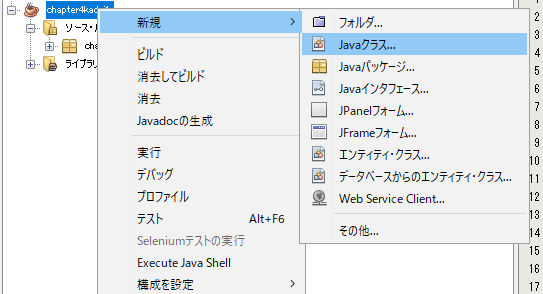
Figure:Right click on current project in the project pane - select
New > Java Class...from the rigth-click menu items - input
Useras Class Name andchapter4kadai1.recordsas Package Name inNew Java Classdialog, and selectFinishbutton.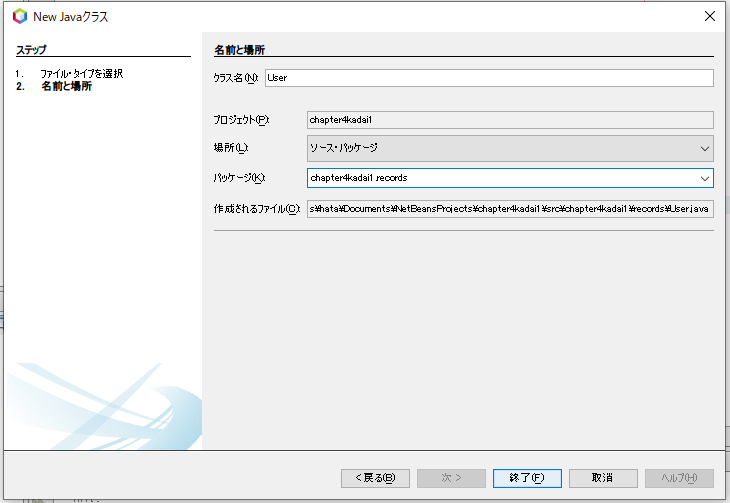
Figure:Add a class by using `New Java class` dialog - open
User.javainchapter4kadai1.recordsof source package, and modify the program of Figure 3 with proper step in the editor pane of NetBeans.
(4.1.1.節をよく読み、chapter4kadai1プロジェクトを作成し、図3と図4のプログラムを作成し、ソースコードと実行結果を示しなさい。なお、図3のプログラムの追加方法は上記の手順に則ること。)